Threads Photo Downloader
Download Photos from Threads in High Quality
ThreadsMate - Best Threads Photo Downloader
What is a Threads Photo Downloader? Threads Photo Downloader is an online tool developed by ThreadsMate that allows you to download photos from Threads to your phone, tablet, or computer in high quality.
ThreadsMate works smoothly on popular browsers including Chrome, Safari, Edge, Firefox, and Opera, making it easy to save your favorite Threads images on Android, iPhone, iPad, Windows, Mac, and Linux devices without installing software or applications.
The tool is simple to use. All you need is the Threads post link containing the image you want to save. Once you paste the URL into the downloader, our server processes the request and provides the image file for download within seconds.
What's Special About Threads Photo Downloader?
- Save and download Threads photos in high quality.
- Download photos from carousel posts when multiple images are available.
- Works on Android phones, iPhone, iPad, PC, and Mac devices.
- Supports downloading images from public Threads posts.
- No software installation or browser extension required.
- Compatible with Chrome, Safari, Firefox, Edge, and Opera browsers.
- Fast server-side processing and downloads.
- Simple copy-and-paste interface.
- Multilingual support for users worldwide.
- No account registration or login required.
How to Download Photos from Threads?
- Open the Threads app or website and sign in to your account if needed.
- Navigate to the Threads post containing the image you want to download.
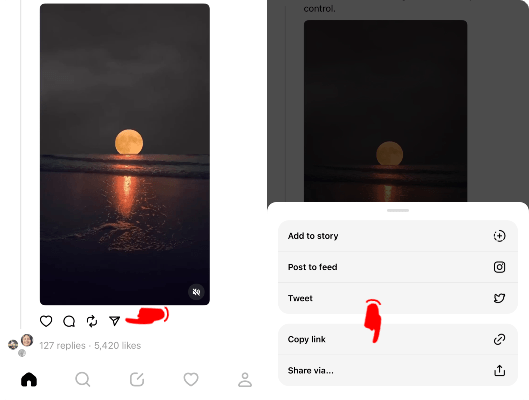
- Tap the Share button and select Copy Link.
- Paste the copied link into the input box on ThreadsMate.
- Press the Download button.
- Wait a few seconds while our server processes the data.
- Save the photo to your device.
Download Photos from Threads Carousel Posts
Some Threads posts include more than one photo in a carousel-style post. ThreadsMate checks the public post link and displays the available images separately whenever multiple photos are detected.
You can choose the photo you want to save, or download each available image one by one. This makes it easier to save complete photo sets from Threads without taking screenshots or cropping images manually.
How to Download Threads Photos on iPhone?
Note: ThreadsMate works on iPhone, iPad, and other iOS devices through Safari and modern mobile browsers.
- Open the Threads application on your iPhone or iPad.
- Find the photo you want to save.
- Tap the Share icon and choose Copy Link.
- Open ThreadsMate using the Safari browser.
- Paste the copied Threads post URL into the search box.
- Tap the Download button.
- Save the image to your Photos app or Files folder.
Why Use ThreadsMate to Download Threads Photos?
ThreadsMate provides a quick and reliable way to save images from Threads directly to your device. The downloader is designed with a simple interface that allows users to download photos with just a few clicks.
Unlike screenshots that may reduce image quality, ThreadsMate retrieves the highest available image resolution whenever possible. This helps preserve image clarity and detail when saving Threads content.
Because the downloader works entirely online, there is no need to install software, applications, or browser extensions. Simply copy the post link, paste it into the downloader, and save the image to your phone or computer.
Frequently Asked Questions
Step 2: Open ThreadsMate, paste the copied URL into the input box, and click the Download button.
Step 3: Wait for the server to process the request, then save the image to your device.